Photoshop Importer
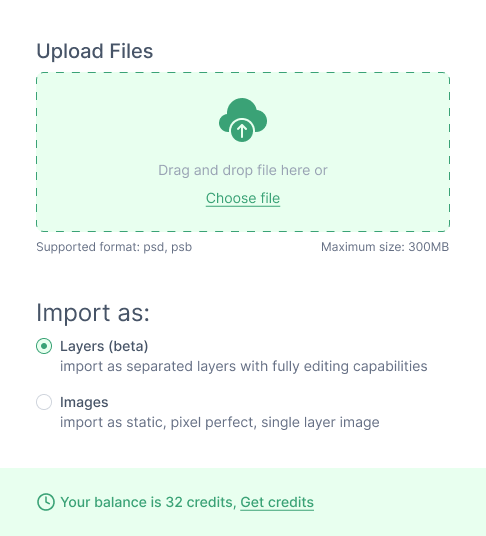
Move your Photoshop designs into Figma effortlessly. Import .psd files as pixel-perfect images — ready to use in your Figma projects without any manual work.
Try it free in Figma
Image
Photoshop to Figma in seconds
Stop manually recreating your Photoshop designs. Import your .psd files directly and get a pixel-perfect result inside Figma, every time.
checkImport .psd files directly into Figma as pixel-perfect images
checkSupports standard and complex Photoshop file structures
checkWorks seamlessly in both Figma & FigJam
checkNo monthly subscription — pay only for what you import
checkNo registration required — runs directly inside Figma
check2 free credits to try before you buy
Photoshop Importer screenshot
Simple, credit-based pricing
No monthly subscriptions. Buy credits once and use them whenever you need — they never expire.
Basic
$14

Includes:
check50 import credits
checkStandard email support
checkCredits never expire
checkNo registration required
Get started
Standard
$28

Includes:
check150 import credits
checkPriority email support
checkCredits never expire
checkNo registration required
Get started
Premium
$44

Includes:
check300 import credits
checkPremium customer support
checkCredits never expire
checkNo registration required
Get started
Frequently Asked Questions
Everything you need to know about Photoshop Importer.

What is an import credit?

An import credit is a unit used to import a file. Credits are consumed based on file size and never expire — no subscriptions or recurring charges.

Yes! You get 2 free credits when you first install the plugin, letting you import and evaluate the results risk-free.

Credit usage is based on file size. The plugin shows the estimated cost before you confirm, so you always know what to expect.

No. Purchased credits never expire. Buy once and use whenever you like — no time limits.

Yes, the Photoshop Importer works in both Figma design files and FigJam boards.

The plugin imports your .psd as a pixel-perfect image. Individual layer editing is not available in this version, but the visual output matches your Photoshop file exactly.

The plugin handles standard PSD files. Very large files may take a moment to process. If you run into issues, contact us at support@figmats.com.

Reach out to us at support@figmats.com — we typically respond within one business day.